
Docs
Eagle Eye reads one JSON feed and redraws every 5 seconds. Install it, run it on the demo feed, then write a feed from your own agents.
Install
One line. It downloads Eagle Eye into ./eagle-eye and serves the demo on http://localhost:8000.
curl -fsSL eagleeye.sh/install | shRunning it again updates the app files and keeps your config.js. Options, as environment variables:
EAGLE_EYE_DIR=path     where to install            (default: ./eagle-eye)
EAGLE_EYE_PORT=8000    port for the local server   (default: 8000)
EAGLE_EYE_REF=main     branch or tag to install    (default: main)
EAGLE_EYE_NO_SERVE=1   install only, do not start the server
By hand
No build, no dependencies, no account.
git clone https://github.com/utopia-models/eagle-eye && cd eagle-eye
python3 -m http.server 8000      # or: npx serve .
# open http://localhost:8000
Everything you see first comes from demo/data.json, which is made-up sample data. Every campaign, person and step has its own page at /campaigns.html, fed by demo/campaigns.json (also made up). The same demo runs at eagleeye.sh/demo.
Hunts and roosts
Each agent gets a lane on the eye. What it sent out sits on the outer ring; what came back sits on the inner ring.
- Hunts (ring 0): applications, proposals, cold email, posts. Each hunt shows what was sent and what was answered.
- Roosts (ring 1): replies, clients, your network. Each roost shows its rows.
It fits whatever screen it is on, with no scroll bar: a phone, a laptop, a 1080p wall, an ultrawide, or half of a desk. At every size hunts and roosts sit side by side on top, and the eye takes the room below them.
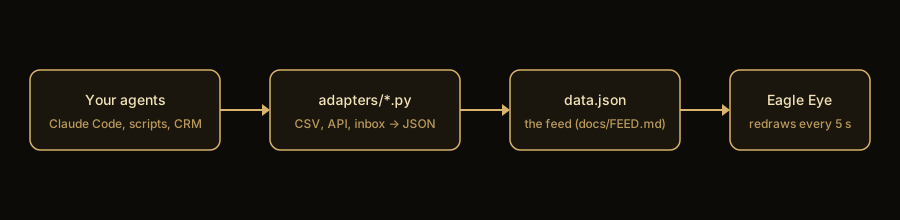
Plug in your agents
Give each agent a lane. Have it append one row per action to a CSV ledger, or write the feed JSON directly.
- Write a feed in the feed shape. The reference adapter turns a CSV ledger (one row per application or status change) into a feed.
- Point
feedin config.js at it, and name your lanes inpipes. - Re-run the adapter on a schedule: cron, a systemd timer, a serverless function. The page picks up changes within 5 seconds, with no reload.
# ledger.csv, one row per action, in time order
ts,lane,org,role,status
2026-11-02 10:00,job_boards,Northwind,Backend engineer,applied
2026-11-05 16:20,job_boards,Northwind,Backend engineer,interview

python3 adapters/csv_feed.py ledger.csv > data.json
python3 adapters/csv_feed.py --self-test
Statuses the adapter counts: found, applied, replied, screen, interview, offer, signed, rejected (a rejection counts as a reply). Any adapter that writes the same JSON works: a CRM export, an ATS API, an inbox count. Source: adapters/csv_feed.py.
Feed format
Eagle Eye polls one JSON document every 5 seconds. Anything that can write this shape can drive the screen: a cron job, a serverless function, a database view.
{
  "updated": "2026-11-15T09:00:00Z",          // when your adapter measured it
  // funnel totals: every key named in config.js `stages` and `key4`
  "applied": 214, "replied": 31, "interviews": 7, "offers": 2,
  "hunts": {                                   // one entry per ring-0 lane, keyed by `hk`
    "job_boards": {
      "sent": 214,                             // what you sent out (outer ring)
      "answered": 31,                          // what came back (inner ring)
      "status": "live",                        // live | partial | empty
      "reason": "...",                         // shown instead of numbers when empty
      "window": "last 30 days", "what": "...", "source": "...",
      "last_action": {"ts": "2026-11-15T08:41:00Z", "event": "applied"}
    }
  },
  "roosts": {                                  // one entry per ring-1 lane, keyed by `rk`
    "clients": {
      "rows": [{"name": "Northwind Labs", "hunt": "referrals",
                "stage": "contract", "contracts": 1, "paid": "$4,800"}],
      "reason": "..."                          // shown when rows is empty
    }
  }
}
Rules the UI keeps, so your adapter should too
- Never send a zero you did not count. A lane you cannot measure gets
"sent": null, "status": "empty"and areason; the screen shows the reason, dimmed, instead of a fake 0. - A failed measurement writes nothing. Keep the last good document rather than replacing it with an empty one.
config.js
Everything in config.js is optional except a feed and at least one lane.
window.EAGLE_EYE = {
  feed: 'demo/data.json',   // any URL that returns the feed JSON
  // ring 0 = a hunt, read from feed.hunts[hk]
  // ring 1 = a roost, read from feed.roosts[rk].rows
  // w = the lane's share of its ring
  pipes: [
    {id:'job-boards', ring:0, hk:'job_boards', name:'Job boards', w:3},
    {id:'cold-email', ring:0, hk:'cold_email', name:'Cold email', w:2},
    {id:'clients',    ring:1, rk:'clients',    name:'Clients',    w:1},
  ],
};
The full file, with funnel stages and per-lane links: config.js on GitHub.
Check the layout
Six sizes in three browsers. It fails on any overlap, anything off screen, or a scroll bar.
npm i && npx playwright install chromium webkit firefox
python3 -m http.server 8000 &
npm run check
Licensed under the MIT License. Questions and fixes: GitHub issues.